How to Create a Wedding Anniversary Report
A Wedding Anniversary
report enables you to create a list of wedding anniversaries that includes
each member's name and contact information. This report gives staff quick
access to member wedding anniversary information that can be used for
anniversary announcements, mailings, emails, and other wedding anniversary
acknowledgements.
Click
 to display the Member List page.
If you manage multiple organizations,
select the desired one from the Organization
list.
You can generate
a list that shows the wedding anniversaries of selected members or
you can create custom lists by using advanced filter options. Do one
of the following:
If you want
to generate a list of specific members' anniversaries, select the
checkbox next to the desired names in the Member
List grid. Then, go to Step 4.
If you want
to create a custom wedding anniversary list, click  to open the Filter
window. Enter or select your criteria in the fields provided.
to open the Filter
window. Enter or select your criteria in the fields provided.
For example:
If you want
to create a wedding anniversary
list for a specific family group or workgroup, select the group from
the Family Group dropdown list or select the checkbox of the desired
workgroup. Then, click  .
.
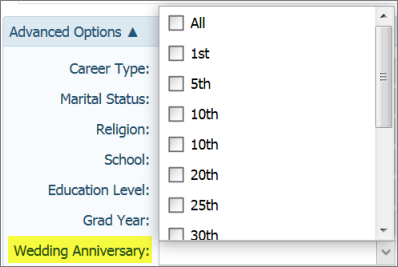
If you want to create a list that shows
members who are celebrating significant wedding anniversaries (for
example, 1st, 10th, or 25th), click Advanced
Options.
Scroll down to the Wedding
Anniversary
option, check the desired milestone anniversaries. Then, click .
The
Member List
updates with your filter selections.
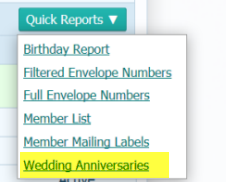
To
generate the report, click  . Select
the Wedding
Anniversaries option:
. Select
the Wedding
Anniversaries option:
The Wedding Anniversaries report opens in
the Report Viewer. The report shows
the wedding date, years married, mailing name and address, and home phone
number. For example:

Use
the toolbar functions at the top of the Report Viewer to view, save,
print, or export the file.
Related Topics
About
the Member List Page
How to
Print, View, and Save Reports
How
to Filter Records
<Back to
top>