How to Create a New Marriage Record
 Your ability to see sacrament data is controlled by your diocese. If your diocese chooses to hide a specific sacrament, the sacrament does not appear in the Sacraments dropdown list. If your diocese chooses to hide all sacraments, the Sacraments button is not available.
-
Click  . Select Add/Edit Sacraments to display the Sacraments page.
-
If you manage multiple organizations, select the desired organization from the Organization list.
-
Before you can create a new marriage record, you must conduct a search to make sure that a record does not exist. Do the following:
-
From the Sacrament filter list, select Marriage.
- Type the last name of the member in the Last Name field. If desired, type the maiden name (if applicable) and the first name.
- Click
 .
.
- If the system finds no record, it displays this message: No Sacrament Records found.
- If the system finds members matching your search criteria, a list of potential matches is displayed. An icon to the left of the record indicates its status:
 (Complete) or
  (Not Complete).
-
To create new marriage record, click  .
.
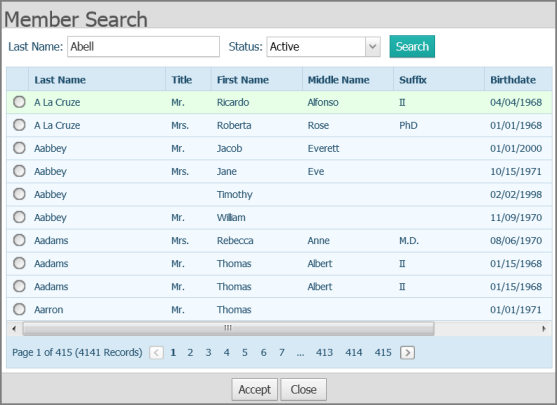
The Member Search window opens. The name of the member you are searching for is displayed in the Last Name field at the top of the window, as shown in this illustration:
-
Click .
A list of names matching your search criteria is displayed.
-
Select the name of the member for whom you want to create the marriage record. Then, click  .
.
-
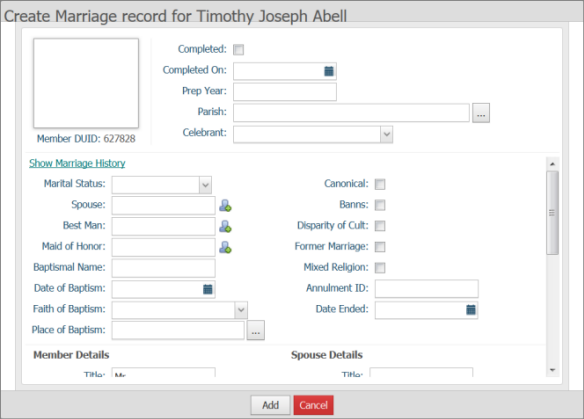
Complete or update the fields in the record.
The Member Details area is pre-populated with the member's name details pulled from the member's record. The Spouse Details section lets you add spouse information into the marriage record.
-
When done, click  to create the new marriage record.
A message is displayed to inform you that the record was created.
-
Click  to dismiss the message.
The marriage record is saved.
Related Topics
About the Sacraments Page
How to Edit a Sacrament Record from the Sacraments Page
How to Update a Sacrament Record to Include the Parish Name and City
<Back to top>
 to edit the existing record.